VIPER 11 takes off from runway 21L at Nellis Air Force Base, on the north-east edge of Las Vegas, home of the Thunderbirds and the Air Force’s aggressor squadrons. The ground under the jet is real. The mountains on the horizon are where the mountains are, the city is laid out street by street, and from 16,000 ft Lake Mead glints thirty kilometres to the east. The game’s whole world is built around one point: the 21L threshold, at 36.2455° N, 115.0219° W, 1,866 ft above sea level.
Real ground
The shape of the land comes from AWS Terrain Tiles, a free, public elevation dataset that packs heights into image tiles. Near Nellis the data underneath is the USGS’s 3D Elevation Program. Further out it falls back to SRTM, the radar map made from the Space Shuttle, and coarser global sets. The game’s build script stitches four detail levels, sharpest within 28 km of the base and coarser out to 420 km, plus a low-detail horizon ring about 2,000 km across.
The colour comes from aerial photographs, all of them public:
- USDA NAIP 2022, the National Agriculture Imagery Program, 0.6 m per pixel. This is used for the sharpest tiles, within about 3.5 km of the runway.
- USGS The National Map imagery for everything else, from a few kilometres out to the horizon.
- Sentinel-2 cloudless 2016 by EOX, under CC BY 4.0. It is used only to patch a few holes in the USGS coverage north-west of the city, after colour-matching it to its neighbours.
All of it is graded toward the warm ochre of the reference clip’s desert, with a lifted haze floor, a warm gain that fades out in the highlights so that white roofs stay white, and a touch more saturation.
Figure 1 · The tile pyramid
Streamed by distance
You cannot draw 9,000 tiles every frame, and you don’t need to: a tile 100 km away covers a few pixels. The terrain uses CDLOD, continuous distance-dependent level of detail, from a 2010 paper by Filip Strugar. The tile pyramid is a quadtree. Each tile is drawn while the camera is within a few tile-widths of it (3.2 by default, tuned at runtime so that one texel of imagery stays under a pixel). Closer than that, it splits into its four children. Stand on the runway and the tiles under you are 247 m across; look at the horizon and they are a hundred kilometres wide.
The clever part is what happens at the seams. Every vertex knows where it would sit on its parent’s coarser grid. Through the outer part of a tile’s range (68–95% of it), the shader slides each vertex smoothly from its own position to its parent’s, and the imagery blends the same way. By the time a tile is swapped for its parent there is nothing left to pop. Tiles arrive coarse-first and nearest-first, up to twelve at a time. The images are compressed GPU textures that are decoded in background threads, and the least recently used tiles are dropped beyond 1,400.
Figure 2 · The quadtree around the jet
The ground is not flat, and it is not even a flat map that has been bent. Every vertex is computed on the CPU in double precision, from latitude, longitude and height, onto the real WGS84 ellipsoid, and then expressed relative to the camera, so the horizon drops away exactly as the Earth does. One shortcut is worth admitting: the elevation data is measured from sea level and the game treats it as height above the ellipsoid, so the whole valley sits about 30 m out of place. From the cockpit, nobody can tell.
A runway you can roll down
A 0.6 m photograph is plenty from 3,000 ft and hopeless at 3 ft, where it smears into beige mush right under the wheels. So the runway itself is drawn procedurally, in a shader, at any resolution you can get close enough to see. The markings are modelled on the FAA’s standard: aiming-point blocks at 1,020 ft, touchdown-zone bars in groups of three, two and one, and 120 ft centreline stripes with 80 ft gaps. Paint wears through a noise mask. The threshold bars break the rule on purpose: four bars a side, copied from the reference clip’s first frame. Under the paint is concrete in 15 m by 7.6 m slabs with sealed joints, the same joints that thump through the wheels at 15 m intervals, and seven layers of tyre rubber, heaviest in the touchdown zone.
Figure 3 · The first 4,700 ft of 21L
The hard part was making the painted runway sit exactly on the photographed one. The runway ends came from OurAirports’ public data, then were corrected by about 15 m and half a degree against the centreline painted in the NAIP imagery. The ground around the runway is flattened onto a plane fitted through the four runway-end elevations, blended back into the terrain over 200 m. The taxiways, the hold-short line, the hangars and the tower were all placed by hand, at the spots where the imagery shows the real thing.
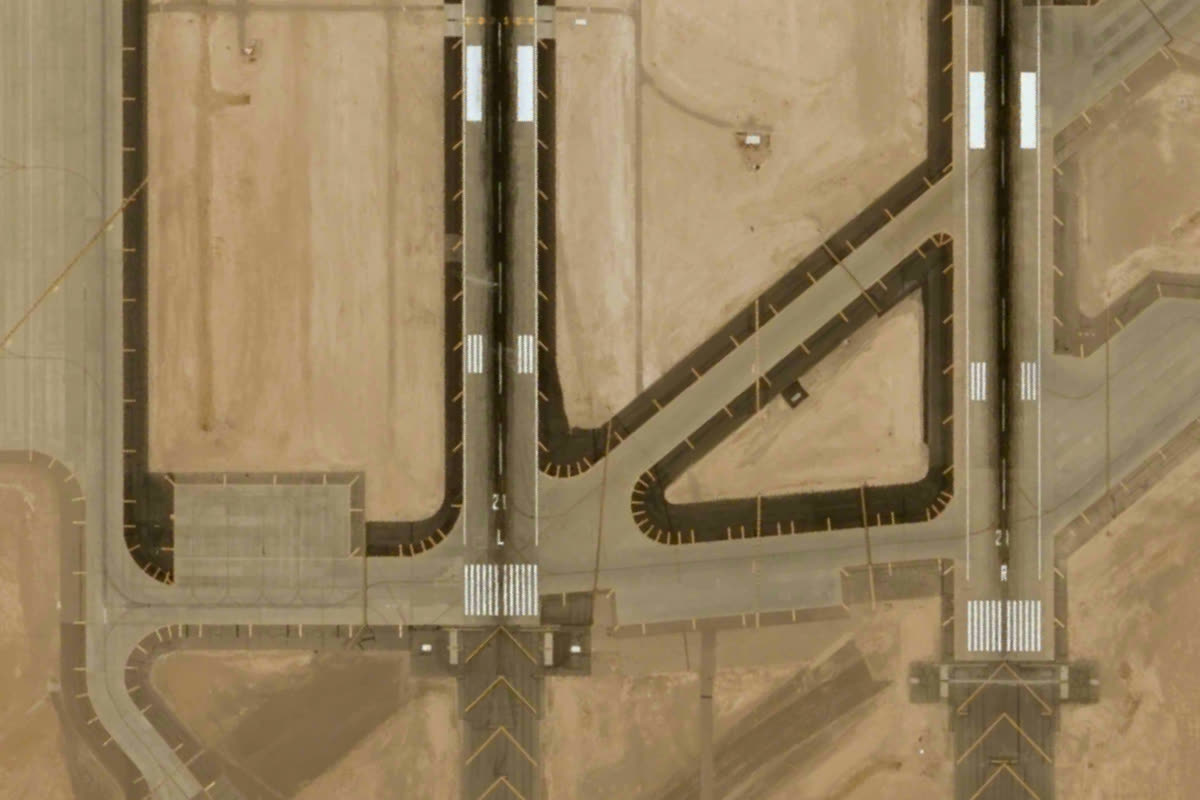
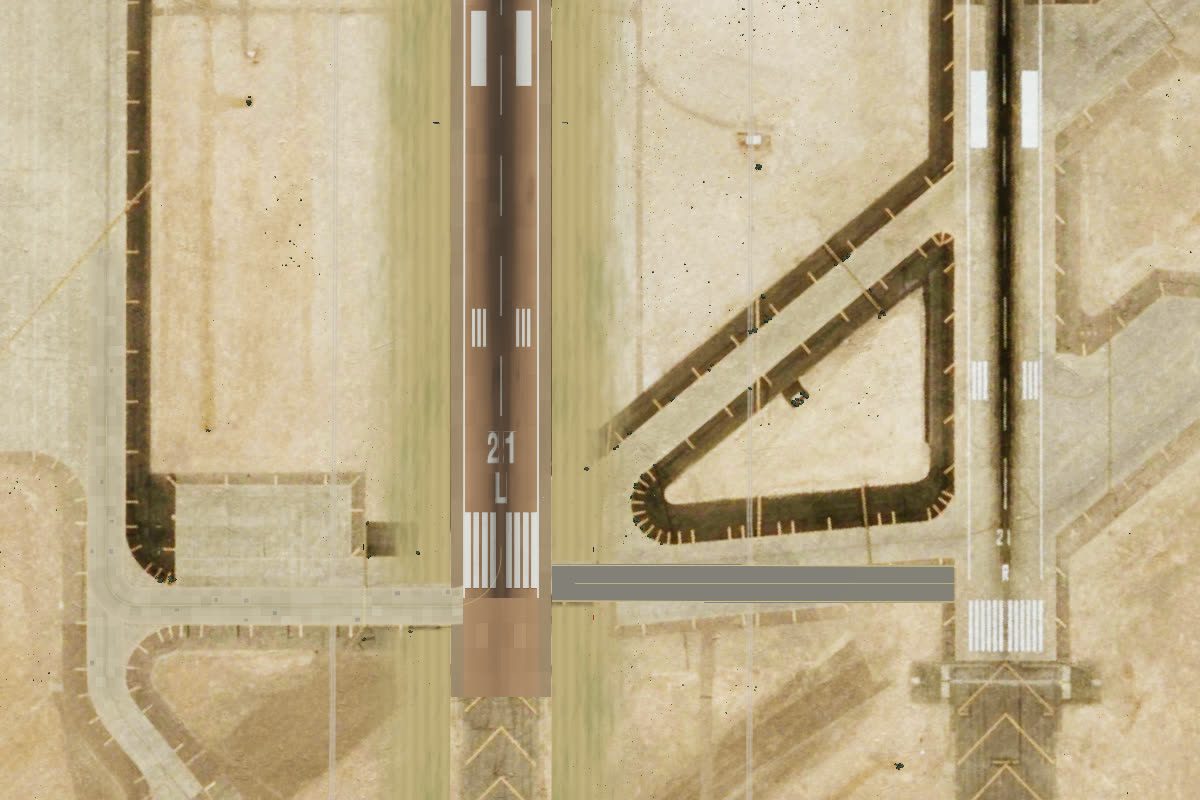 ImageryRender
Ground cover
From a fast jet a few metres up, a photograph looks like a photograph. What sells the speed is things that stick up. Within a kilometre of the runway stand 8,477 creosote bushes, each placed where the NAIP image’s near-infrared band shows a bush. The build script compares the vegetation index (NDVI) against its surroundings on bright bare ground, because “creosote is the only green thing out here”. Out to 3 km there are another half a million instances of grass, shrubs and rocks. They gather in the washes the imagery reveals, never on pavement or roofs, and fade out by distance: rocks by 650 m, grass by 2.3 km, shrubs by 3.2 km. Three public-domain ground scans from Poly Haven add grain at three scales, down to gravel at your feet.
Far away the details soften into atmosphere: the haze, the blue of distance and the shadows of the clouds all come from the sky system in the clouds note. Lake Mead is found in the imagery by its colour (bluer than red, and dark), and gets a Fresnel reflection of the sky and a glint of sun on top.