For its first months VIPER 11 had one airfield: Nellis, in the desert north-east of Las Vegas. Now it has three. Hill Air Force Base sits under the mountains of northern Utah, and Naval Air Station Key West sits on a flat coral key at the bottom of Florida. A new place to fly turned out to need more than new ground. It also needed a way back: something to tell you where the runway went once you had flown away from it.
A world per airfield
Each airfield is a theater, a self-contained world in a single file under src/theater. A theater owns the point the whole scene is measured from (the threshold of its main runway), the ground under the jet, the runways, where a flight starts, the names the radio uses, the magnetic variation, the clock the sun runs on and the weather. Everything else in the game reads those values from the active theater instead of assuming Nellis. The game picks a theater once, when the page loads, from the Airport menu or from ?theater=hill in the address. Switching means reloading, so nothing has to be rebuilt mid-flight.
The ground at all three is built the same way: real elevation and public aerial photographs, baked into a tile pyramid and streamed around the jet. That story is told in the Nellis note. What changes is what that ground is like.
Hill is high. Runway 32 is 13,500 ft long and sits at 4,780 ft above sea level, almost 3,000 ft above Nellis, so the air is thinner and the jet covers more ground for the same indicated speed. The Wasatch Front rises straight out of the valley a few miles east of the runway, to about 9,700 ft within 15 km of it, and the Great Salt Lake lies flat and pale to the west. Afternoon cumulus sits high here, with bases around 10,200 ft and tops near 14,500, broken over the peaks and thinning over the lake. When Approach vectors you home, the altitude it gives you keeps 1,500 ft above the highest ground on the way, and at Hill that ground is real mountains.
Key West is the opposite. Runway 08 is 10,001 ft long and 5 ft above sea level, on a key not much higher than that. The bake floors the elevation data at zero, so everything around it is sea: turquoise shallows, mangroves and the Overseas Highway running east from island to island. The cumulus is low and puffy, bases at 4,200 ft, so the climb-out punches through cloud far sooner than in the desert. Boca Chica Field has three runways; 08/26 is the one drawn as real geometry, and the other two are there in the photographs.
Neither new field has its taxiways in yet, so there you start lined up on the runway rather than on the taxiway. The radio is their own: Hill Tower and Salt Lake Approach, Navy Key West Tower and Navy Key West Approach.
Which way is north
The first thing the new fields showed was how easy it is to get lost. At Nellis the Strip is a landmark you can’t miss. Over the Great Salt Lake, or over open water at Key West, the ground gives you much less to go on.
So the game now has a compass tape: a thin heading strip across the top of the frame. It spans 120° from end to end, with small ticks every 5°, taller ones every 15°, the cardinal letters in italics and the intercardinals smaller. A fixed index sits in the middle, with your heading under it, and the tape slides beneath it as you turn. The heading is magnetic, like everything a pilot reads, because that is how runways and the radio count, as we’ll see. The world itself runs on true north, so the tape subtracts the theater’s variation: 11° east at Nellis, 10.5° east at Hill, 5.5° west at Key West.

Three things ride on the tape. The home field is marked at its bearing; when it is more than 42° off the nose it leaves the tape and becomes a chevron at the nearer end, pointing the shorter way round, with the distance beside it. When Approach gives you a heading, or the autopilot is flying you home, that heading appears as an amber bug; off the tape it pins to the end, dimmed. And while the sun is up, a tiny warm dot sits at its bearing, which turns out to be a surprisingly good way to keep your bearings. Within 1.5 nm of the field the home mark goes away, because by then you can see the runway.
Figure 1 · The compass tape
src/ui/compassTape.ts, with the same span, ticks and limits. The field is at 015°, 16 nm away; Approach wants 080°; the sun is at 214°. Drag across the tape, or use the slider, to turn. Past 42° the field’s mark becomes a chevron at the end; past 34° the bug pins to the end.The tape is cheap, which matters in a game that spends almost all of its frame on the sky. Its elements are built once. In a frame it writes two or three CSS transforms, which the browser’s compositor handles without redoing the layout, and it changes one text node only when the rounded heading changes.
The diamond, and home
The tape tells you which way. The steerpoint tells you where. It is a small hollow diamond drawn over the world, as on the F-16’s own HUD, with a quiet readout under it: “HILL 16 NM · 3 MIN”, the distance and the time at your current ground speed. It is projected through the game’s lens model, the same distortion that bends the horizon at the edges of the frame, so it sits exactly on the spot it marks. If that spot is off the screen, the diamond waits at the edge with a chevron pointing the way.
The diamond doesn’t point at the airfield itself. From farther than 11 nm it marks a point on the final approach, 6 nm out from the runway and at the height of the glide path, because flying straight at the field would put you over it, not lined up with it. Closer in, it moves to the runway threshold. Once you are lined up on final inside 6 nm it disappears, and the runway takes over.
That is why the tape’s home mark is drawn differently from the diamond. The mark on the tape is the airfield, the middle of the runway; the diamond is where to fly next. Inbound from the south-west at Hill, the two sit a few degrees apart, and the gap grows as you get closer. (The home mark’s exact look is still being tuned as I write, so the pictures here may differ slightly from the game you fly.)
Which runway, and which way
The steerpoint brings you to a runway, but a runway has two ends, and you can land on either. Real pilots find out which one is in use, and which way it points, from the runway’s name and the wind.
A runway’s number is its magnetic heading, rounded to the nearest ten, without the last zero. Landing on Nellis 21L you fly about 210° magnetic; the same strip of concrete flown the other way is 03R, 180° round. Parallel runways add L, C or R, left to right as you land. Hill’s runway points 333° true; with 10.5° of east variation that is about 322° magnetic, so it is runway 32, and its other end is 14. Key West’s main runway points 73° true, but there the variation is 5.5° west, which adds instead: about 78° magnetic, runway 08. Magnetic north drifts slowly, so every few decades an airport repaints its numbers.
Figure 2 · From a heading to a runway number
The wind decides which end is in use. An aircraft takes off and lands into the wind: a headwind takes knots off the ground speed, so the roll is shorter and the jet is easier to hold straight. The tower picks the runway that gives the most headwind and the least crosswind, and it tells everyone at once through the ATIS, the Automatic Terminal Information Service. That is a recorded broadcast, renewed every hour or when the weather changes, with the runway in use, the wind, the altimeter setting and a code letter. Pilots listen to it before they call the tower and say they “have information Papa”, so the controller knows they heard it. The winds on the ATIS and from the tower are given in magnetic degrees, so they compare straight with the runway numbers.
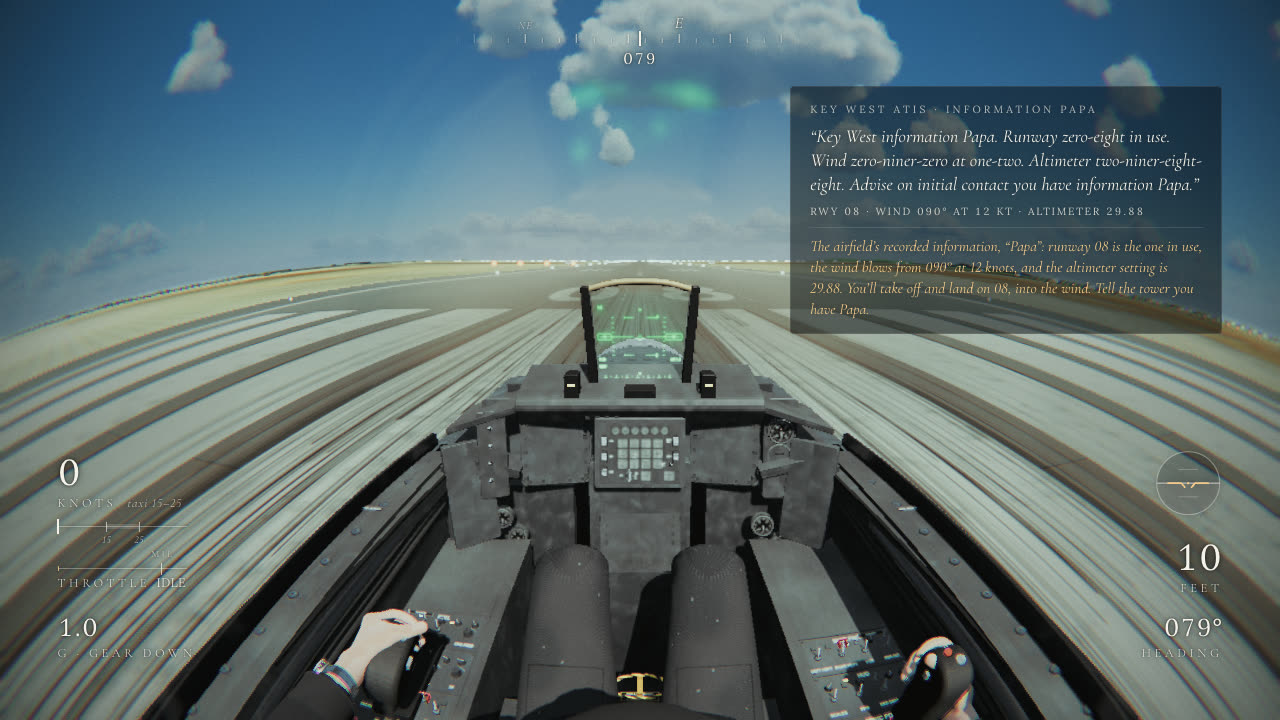
The game now shows an ATIS card when a flight starts. Here is the honest version of how it works. In VIPER 11 the runway in use is fixed for each field (21L, 32 and 08), and the wind is chosen to agree with it. The tower’s takeoff clearance names a wind, the ATIS repeats the same one, and the daily challenge brings its own seeded wind, so the two never disagree. The letter and the altimeter setting change by the hour and the day, from a hash of the airport and the date. The way home is a little cleverer: if you come back from beyond the far end of the runway, Approach brings you in on the opposite end, 14 at Hill or 26 at Key West, rather than sending you round the field.
The approach
Knowing the runway is half of it. The other half is arriving at its end at the right height and speed, and that is what the new approach tutorial teaches (Fly › Approach). It starts you cruising 16 nm out and 6 nm to one side of the final, 8,000 ft above the field at 350 knots, heading away across it. Eight cards then take you home: find the field (the diamond, or Approach’s heading on the tape); get down and slow (idle, the speed brake, and the rule of thumb of three miles for every thousand feet you lose); join the final where the gates line up; gear down; on speed, which in an F-16 means 13° angle of attack, about 145 knots; the glide path; stable by 1,000 ft, or go around; and land it.
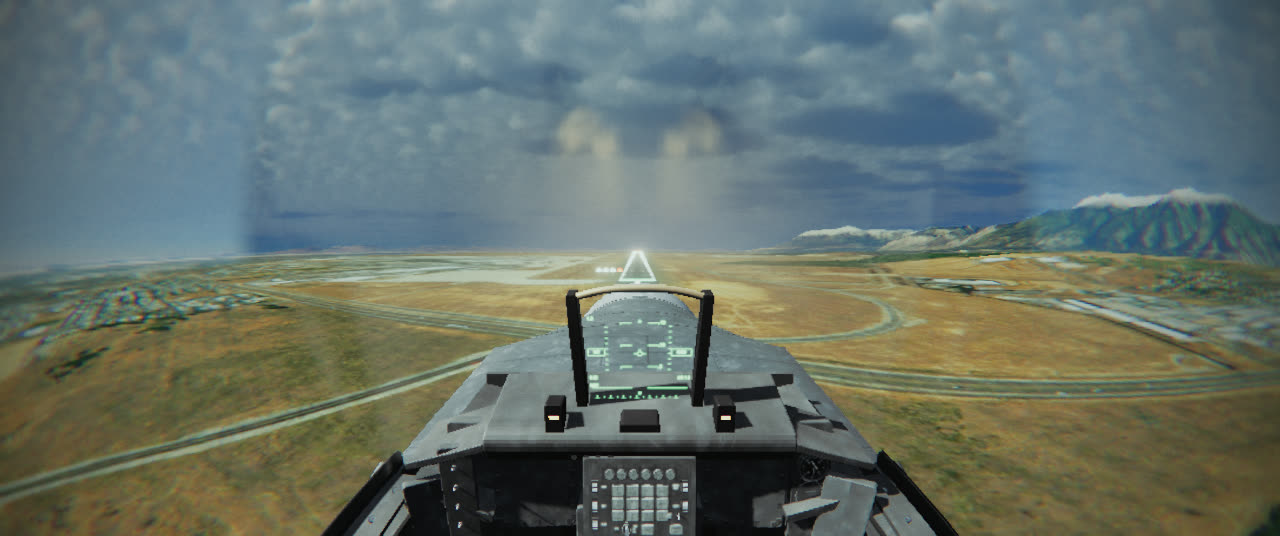
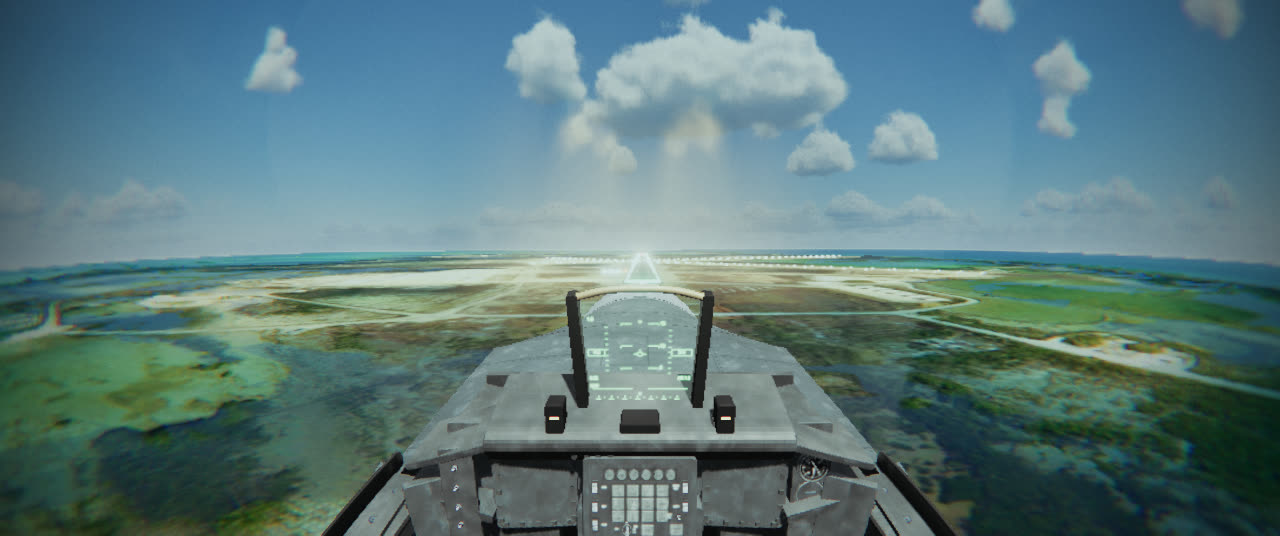
The glide path is 3°, about 318 ft of height per nautical mile, and at 145 knots that means coming down at roughly 770 ft a minute. To fly it, real runways have a PAPI, the Precision Approach Path Indicator: four lights in a row beside the touchdown zone. Each light shines white when you see it from above a set angle and red from below it. The four angles are staggered (3°30′, 3°10′, 2°50′ and 2°30′, from the light nearest the runway outwards), so on a 3° path the two outer lights look white and the two inner ones red. Three or four white means high, three or four red means low, and “two white, two red” is the phrase every student pilot learns.
Figure 3 · What the PAPI shows
src/flight/runways.ts): four units 320 m past the threshold, at the 1,000 ft aiming point, with the real angles. The gold line is the 3° path and the faint lines are each unit’s angle. Drag the jet, or use the sliders, and watch the four lights. Each light blends through pink across 0.05°, as a real one does.In the game the PAPI is computed per pixel, from the camera’s real elevation above each unit, so the picture is exact from wherever you look. The one liberty is the spacing. Real units stand about 9 m apart. The game’s stand 18 m apart, because the wide GoPro lens shrinks the far field so much that at two miles real spacing would merge the four into one dot.
The tutorial watches the same numbers. If you aren’t on speed, on the path, lined up and gear down by 1,000 ft above the runway, it tells you to go around, plays the calls, and Approach brings you round to try again. A go-around is never wrong; real pilots are taught exactly that.
How much help
All of these aids can be switched off, and some players want exactly that. Settings now leads with How much help, three presets over the navigation aids and the HUD, plus your own mix.
| Cadet | Pilot | Ace | |
|---|---|---|---|
| Compass tape | on | on | off |
| Steerpoint diamond | with distance | with distance | off |
| Approach gates | all the way home | on final | off |
| Flight HUD | on | in the lessons | off |
| Radio calls explained | on | off | off |
| Key hints | on | on | off |
src/ui/help.ts. Pilot is the default. Change any row and it becomes Custom, which is remembered.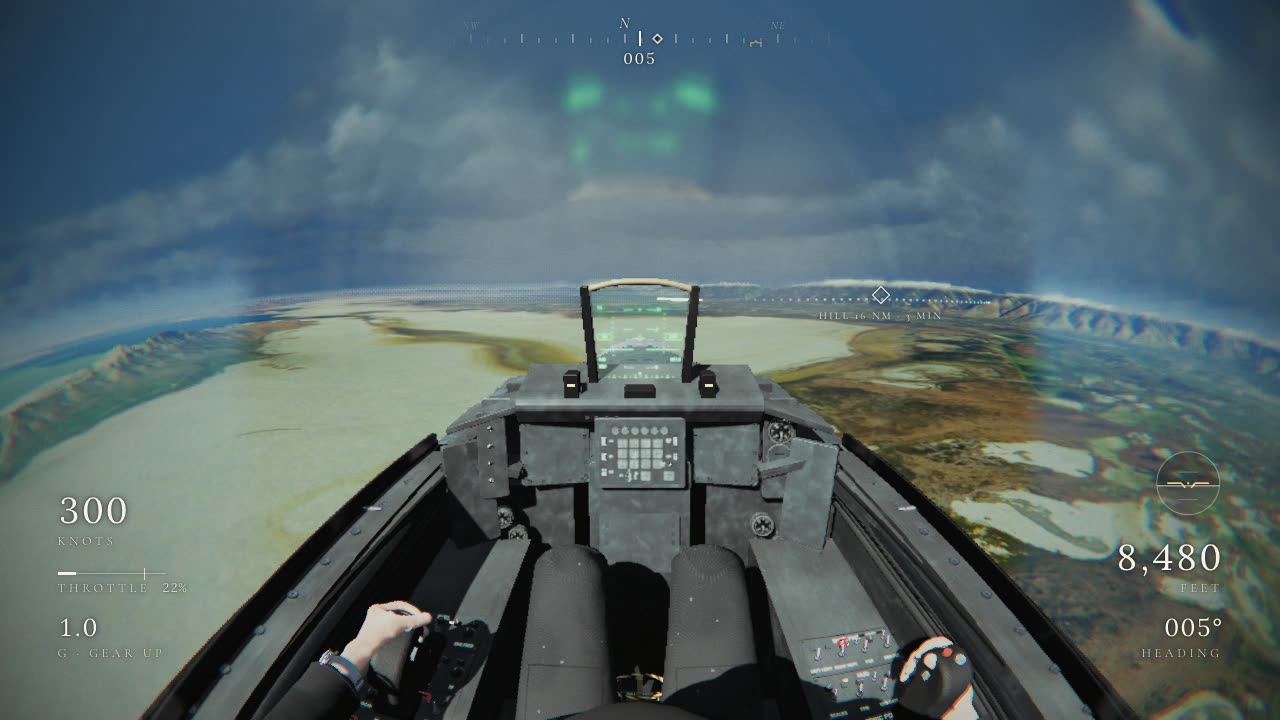
 CadetAce
Ace is the jet and the radio. There is no compass, no diamond, no gates and no readouts. You find the field the old way: by the runway’s number, the heading the controller gives you, the tower’s wind, and the instruments in the cockpit. The presets only change what you see and hear explained; anything that flies the jet for you, like runway assist, is a separate setting. Every scored run records the preset it was flown on.