Pick up a game pad and VIPER 11 changes its words to match it. The prompts say R2 on a PlayStation pad and RT on an Xbox one. The runway rumbles under your thumbs, harder as the speed builds. On a DualSense, the right trigger pushes back at MIL, the way the F-16’s throttle does, and you squeeze through that resistance to light the afterburner. All of it runs in a browser tab, which takes a bit of persuading.
Which pad is in your hands
A web page reads controllers through the Gamepad API, polled once a frame, as the joystick note explains. A PlayStation pad and an Xbox pad both arrive with mapping: "standard", so the buttons are numbered the same way: button 0 is the bottom face button and button 7 is the right trigger, whatever is printed on them. The bindings never change, because they go by position. Only the labels do.
To pick the labels, the game reads the pad’s id, a free-form string that every browser writes differently. Chrome puts the USB vendor and product numbers in brackets. Firefox puts them at the front, sometimes without the leading zeros. Safari gives only the product name. So the game reads the vendor number where there is one (054c is Sony, 045e is Microsoft, 057e is Nintendo) and falls back on the name where there isn’t. The product number then tells a DualSense (0ce6) from a DualSense Edge (0df2) and a DualShock 4. Only a DualSense has adaptive triggers.
Figure 1 · Same buttons, different words
src/input/padFamily.ts) and glyphs (src/ui/padGlyphs.ts), run on this page. Pick an id string as a browser reports it, and the game’s own prompts are redrawn for that pad. If you connect a controller and press one of its buttons, its id appears at the end of the row.The game’s text is written with tokens named by position, using the Xbox letters because the standard mapping uses them too: {A} is the bottom face button, {RT} the right trigger. Each family draws them its own way. A PlayStation pad gets ✕ ○ □ △ as small line drawings in their soft blue, red, pink and green, because a font’s versions of those symbols vary from one machine to the next. An Xbox pad gets its letters in their colours. A Nintendo pad gets B A Y X, which sit in the opposite positions to the Xbox letters. Anything else gets a plain diamond with the pressed button filled in.
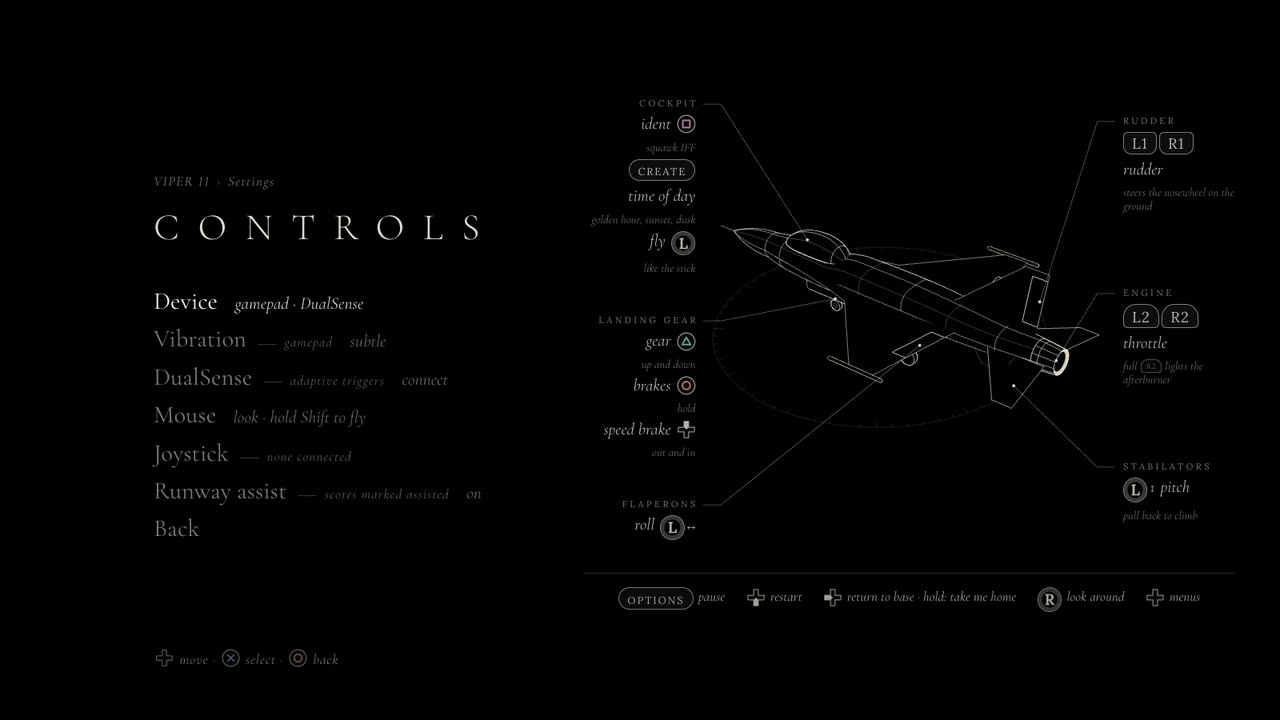
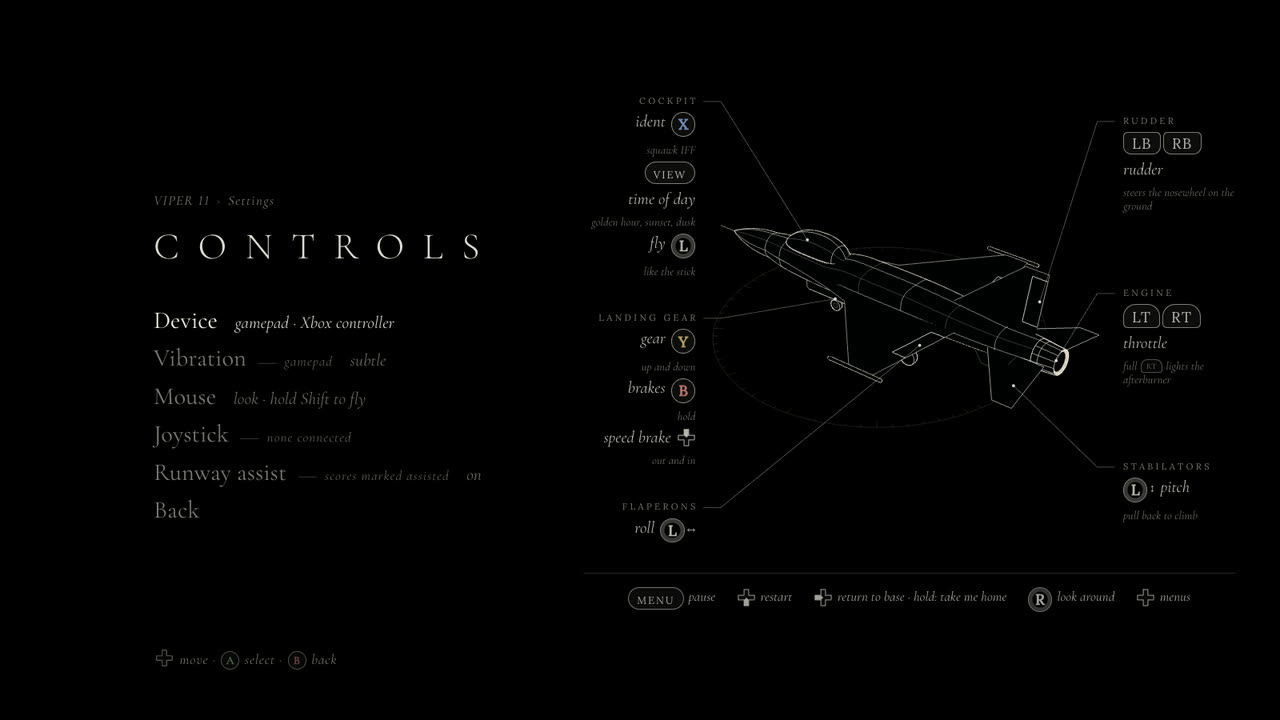 DualSenseXbox
Rumble from the flight model
A pad has two motors. The left one carries a heavy weight and gives a low, slow shake. The right one carries a light weight and gives a fine buzz. The game drives both from the flight model, in two layers that are mixed every frame.
The first layer is a set of beds, steady textures that follow the state of the flight. The runway roll grows with ground speed, from a faint 0.035 at walking pace to up to about 0.19 at 165 knots, with a little noise in it so it doesn’t feel like a motor. The engine gives a short buzz while it spools up. The afterburner gives a fine, continuous buzz. In the air, a shudder starts once the angle of attack passes 72% of the limiter’s, and a heavier, slower shake starts at 72% of the G limit. Cloud adds the occasional bump, and the speed brake a light buffet that grows with airspeed.
The second layer is transients, short pulses fired by events. The brakes letting go: 0.18 s. The afterburner lighting: a 0.16 s thump. Each slab joint on the runway gives a 50 ms tick that gets harder with speed. The gear gives a light knock as it unlocks and a thunk as it locks. The touchdown is scaled by how fast you were sinking: about 0.5 m/s is a greaser, 3 m/s is firm, and anything past 3.5 m/s gets the full hit.
Two vibrations don’t add up the way two numbers do, so the layers are mixed as 1 − (1 − a)(1 − b): each one fills part of what’s left, and the total never passes 1. The Vibration setting then scales the result. The default, subtle, multiplies everything by 0.55 and caps it at 0.6. In level cruise in clear air, nothing plays at all. The rumble is meant to be felt, not noticed.
Figure 2 · What the pad is sent
src/input/haptics.ts), and these are the commands its scheduler sends: the strong motor filled, the weak motor in gold, and the trigger motors below. The dashed line is the airspeed, or for the pull the angle of attack and G as a share of their limits. Move the pointer across to read values. With a pad connected, the button plays the same commands on it, in real time.Sending all this to a pad has its own catch. The Gamepad API doesn’t let you set a motor’s level. You can only ask for an effect with a magnitude and a duration. So the scheduler sends a short effect, 100 ms long, at most 30 times a second, and each one overlaps the next so there are no gaps. Levels are rounded to hundredths. When nothing has changed, the next effect waits until the last one has 40 ms left. When everything goes quiet, a single zero stops the motors, and nothing more is sent until something happens. A takeoff roll comes to about 20 commands a second.
What a browser lets you do
Rumble goes through the pad’s vibrationActuator. Every browser that has it offers "dual-rumble", the two motors. Some also offer "trigger-rumble", which adds the small motors under each trigger of an Xbox pad, the impulse triggers. In practice that means Chrome or Edge on Windows. The game asks the actuator which effects it has and uses trigger-rumble when it’s listed: the right trigger buzzes faintly in afterburner and kicks when it lights, and the left trigger shivers as the wheel brakes bite. Firefox has only an older, single-motor pulse(), where it has one at all, so the game sends it whichever of the two motors is stronger.
| What | How | Where it works |
|---|---|---|
| Glyphs | the Gamepad API’s id | everywhere a pad works; Safari has no vendor numbers, so it goes by the name |
| Two-motor rumble | vibrationActuator, dual-rumble | Chromium browsers and Safari; how well it works depends on the pad and the system |
| Xbox trigger motors | vibrationActuator, trigger-rumble | only where the browser lists it: Chrome and Edge on Windows |
| DualSense adaptive triggers, lightbar | WebHID: raw output reports | desktop Chrome and Edge, after you pick the pad in the browser’s own chooser |
The adaptive triggers aren’t in the Gamepad API at all. A DualSense’s triggers have small motors that push back on your finger, and the pad takes its instructions in an output report, a block of bytes sent over USB or Bluetooth that also carries the rumble, the lightbar and the player lights. The Gamepad API has no way to send one. WebHID does: it lets a page talk to a HID device directly, byte for byte. It needs your permission, though. The first time, a click on the DualSense row opens the browser’s chooser and you pick the pad. After that, the game finds it again on the next visit without asking.
WebHID could read the pad as well, but the game doesn’t use it for that. The sticks and buttons still come through the Gamepad API, the same as on any other pad, and WebHID only writes. That keeps the two from ever fighting over the input. The rumble is the one thing both could send. Once the DualSense is connected over WebHID, the rumble goes into the same report as the triggers, so only one writer ever drives the motors.
A detent you can feel
The F-16’s throttle has a detent at MIL, full power without the afterburner. Past it, the burner lights. On the keyboard the game imitates it with a gate: holding T runs the lever up to MIL and stops it there, and a fresh press goes on. A pad’s right trigger works the same way: the further you squeeze it, the faster the lever moves, up to 55% of the lever’s travel a second, and it stops at MIL. A fresh squeeze, or holding on for three seconds, goes through.
On a DualSense the gate becomes something you can feel. Below MIL, R2 has a light resistance through its travel. At MIL, the trigger puts up a wall from 30% to 60% of its travel. It’s the effect usually used for a gun’s trigger: a firm stop that gives with a click if you squeeze hard enough. The game moves its own gate to match. While the trigger holds a wall, a squeeze only counts as fresh once it passes 55%, just short of where the wall clicks. A light squeeze holds MIL. A deliberate one breaks through to afterburner, where R2 gives a faint buzz at 38 Hz.
Figure 3 · Squeezing through MIL
src/input/input.ts) and its DualSense effects (src/input/padFeedback.ts), run here. Squeeze R2 with the slider, or with your own controller’s right trigger. The bars show how hard each tenth of the trigger’s travel pushes back, the gold line is your finger, and the bytes are the 11-byte effect the game sends. L2 brakes the wheels on the ground, firmer the further it goes in, and goes free in the air.The left trigger brakes. Pulled while the throttle is at idle, it works the toe brakes, and on the ground it has a resistance that climbs from nothing at the top of its travel to the strongest the motor gives at the bottom, so a light pull brakes lightly. In the air there’s nothing to brake, so it goes slack. The lightbar glows a low amber while you fly and pulses red for two and a half seconds after a crash. Of the five player lights, only the centre one is lit.
Writing the bytes
Sony doesn’t publish the DualSense’s report format. The game’s code was written from community documentation: the Linux kernel’s hid-playstation driver for the report layout and the Bluetooth checksum, and a write-up by Nielk1 of the trigger effects, which is also used by tools like DualSenseX. The report has 47 bytes that matter. Two flag bytes at the start say which fields this report sets, so a report that changes only R2 leaves the lightbar alone. Each trigger gets 11 bytes: a mode, then ten zones, one per tenth of the travel, each with a 3-bit strength packed into a 32-bit number.
Figure 4 · One output report
To keep the radio quiet, a report goes out only when something has changed, and no more than once every 33 ms. A change that lands while a report is still on its way is sent in the next one. The pad’s rumble motors are flagged in two places, because older and newer firmware read different bits.
What couldn’t be tested
Like the joystick work, this was built against simulated devices. The test suite swaps in a DualSense, an Xbox pad, a Pro Controller and a generic pad with each browser’s id strings, a vibration actuator that logs every effect, and a fake WebHID DualSense, over USB and over Bluetooth, that keeps every report. The report bytes are checked against vectors worked out by hand from the documentation, and the Bluetooth checksum against Node’s own CRC-32. What only a real hand can judge is the feel: whether 0.6 is too much, whether the wall at MIL is firm enough to find without looking. Those numbers are first guesses, tuned to feel right, and the Vibration setting is there for anyone who disagrees.